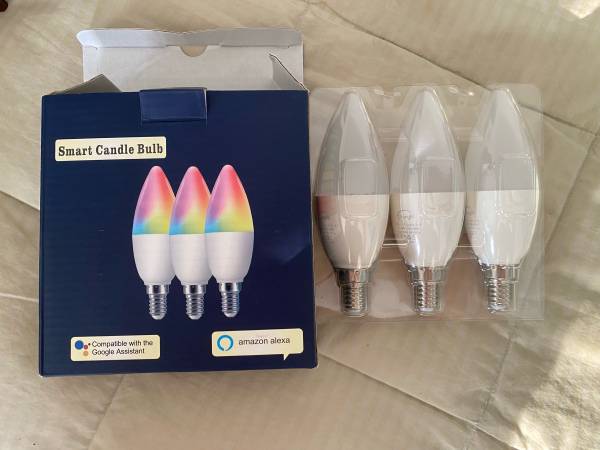
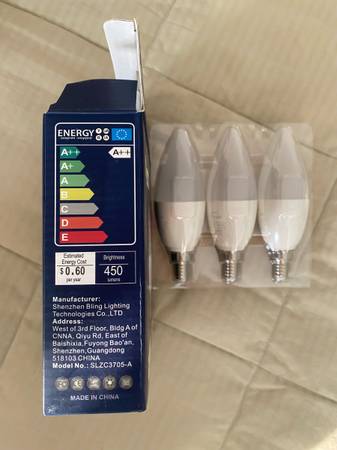
Awesome bulbs. Lightly used before I had to move. Cash only. $25 for all 3 or best offer
Features:
*RGB+ warm white/cold white
*Alexa, Google Assistant, APP control
*Millions Color Changing
*APP setting modes
*Supporting System: Android 2.3, IOS8.0 or above
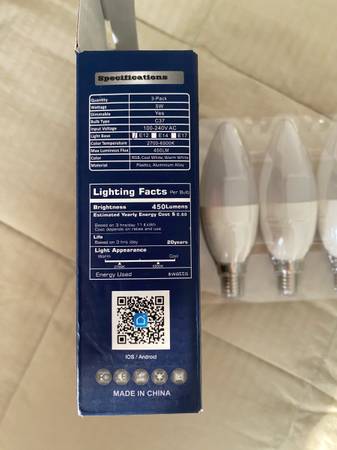
Specifications:
Outer Shell Material: PC and aluminum
Base Type: E12
Input Voltage: AC100-240V 50/60Hz
Power: 5W
Lumen: 450lm
Control Type: APP/Voice
Input frequency: 50-60 Hz
Lifespan: above 20,000 hours
—
Voice Control
Compatiable with Alexa, Google Home and so on. Simply ask the voice assistant to turn on/off, dim and change colors.
Alexa, turn on the bedroom light.
Alexa, change the color to red.
—
Easy Installation
Download the "Smart Life" APP, follow the on screen instructions and enjoy! Add more lights at any time to unlock more features! Remote control your smart lights by using your smart device on matter you are at home or away.
—
Match Any Mode
With over 16 million color, you can transform your room to all kinds of themes such as party, reading, night, meeting, leisure, soft, colors, colorful and gorgeous. Give a “smart life” for your house!
—
Step 1: Search "Smart Life" on Phone or Scan the QR code on User Manual to download it.
Step 2: Connect the bulb to your local 2.4G WIFI with your phone connecting to it.
Step 3: Set up your Smart Life account. Add Device>Lighting devices and confirm the device in the App.
Step 4: Then you turn on the light, then turn off the bulb after 10 seconds, then turn on - turn off within 2 seconds, cycle turn on turn off, untill the APP note connect the bulb.
Tips--App
Be sure that you are using 2.4GHz WiFi when connecting with the smart bulb. And WiFi must be detectable status. Many routers have 5 GHz and 2.4 GHz network and your phone will always automatically connect to the 5 GHz network. So, you have to completely turn off your 5 GHz network by going to your router settings (enter the router IP address into your internet browser, usually something like 192.168.1.1), forcing your phone to connect to the 2.4 GHz network. In addition, the router encryption mode must be WPA2-PSK type and the authentication type must be AES.
—
Connection
Step 1: Log in Alexa App, choose Skills, and search "Smart Life".
Step 2: Select Smart life in the search results, and then click the Enable skill.
Step 3: If account has been bound, click on Disable Skill and click on Enable to bind a new account.
Step 4: Input your account registered for Smart Life App
Tips
Cannot voice control?
Please name the smart bulb without Arabic numerals or special characters, it is better to name the smart bulb with the names which is easy to understand.